Available .NET Frameworks
Major Frameworks
- .NET/ASP.NET:
- An open source framework (originally based on a cut-down version of the .NET Framework) for writing easily deployable Internet apps and microservices that run on Windows, macOS, and Linux
- Recommended for new applications and services
- .NET Framework
- Original implementation of .NET. It supports running websites, services, desktop apps, and more on Windows only
- Superseded by the cross-platform .NET project
- Still widely used in legacy enterprise applications
It is possible to write class libraries that work across all frameworks with .NET Standard.
Overview of the .NET Framework:
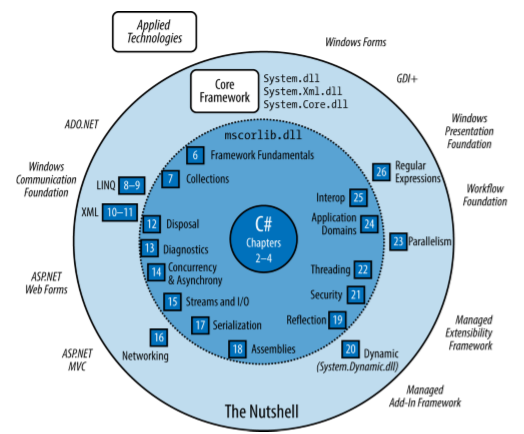
.NET Standard
- This is the set of fundamental APIs (commonly referred to as base class library or BCL) that all .NET implementations must implement
- By targeting .NET Standard, you can build libraries that you can share across all your .NET apps, no matter on which .NET implementation or OS they run
- Used for building libraries that can be referenced from all .NET implementations, such as .NET Framework, .NET Core and Xamarin
Framework overview
The different frameworks are layered like this:
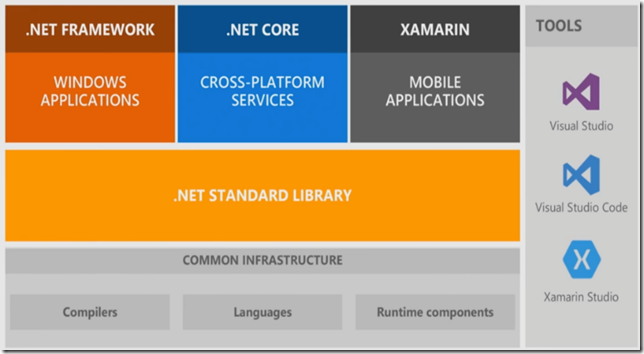
Xamarin has reached end of life. It was replaced by .NET MAUI for cross-platform mobile and desktop application development (which surely won't be discontinued in the future).
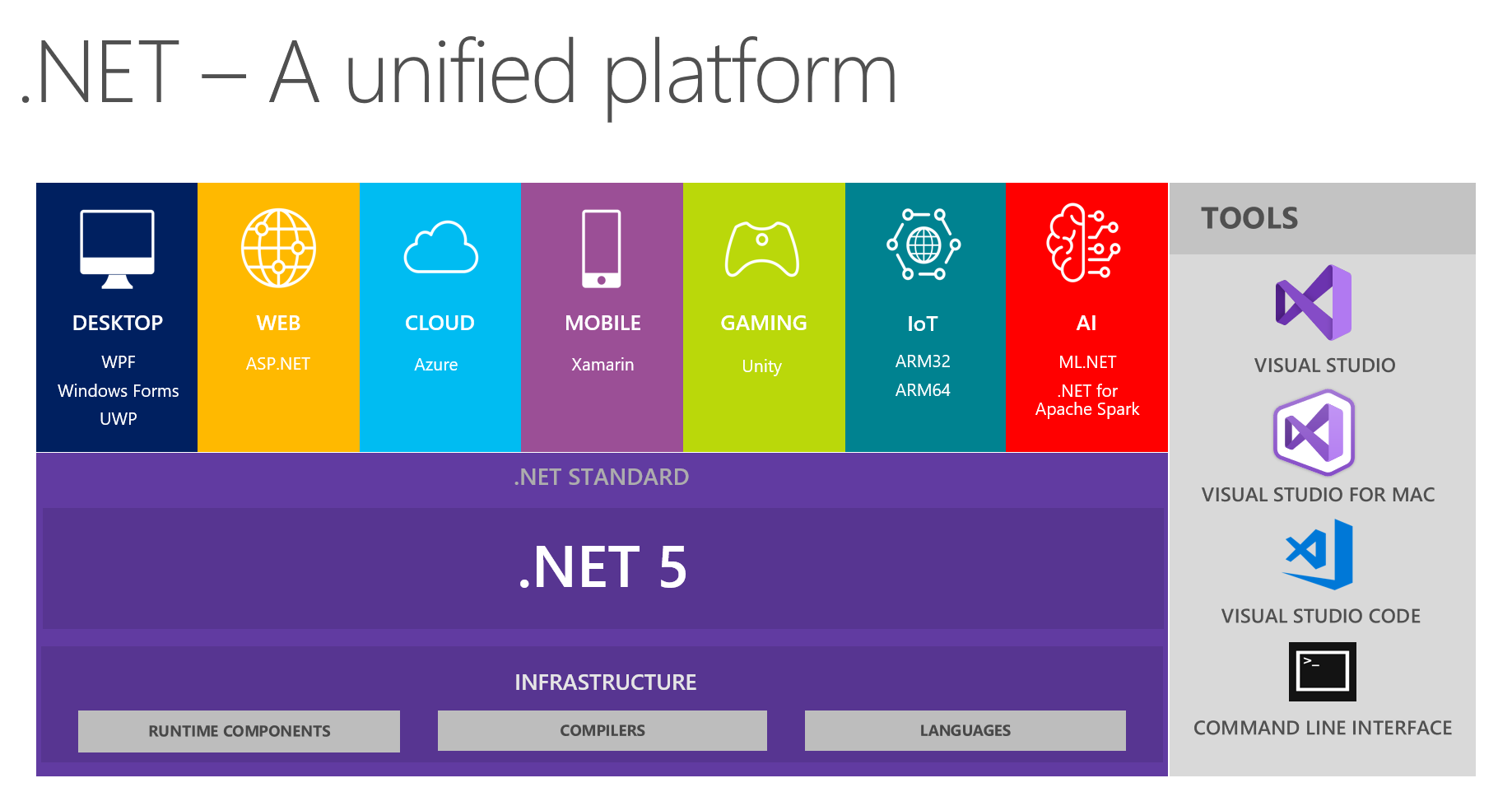
With the introduction of .NET 5 Microsoft wanted to unify all aspects of development into a single platform:
Legacy and Niche Frameworks
The following frameworks are still available to support older platforms:
- Windows Runtime for Windows 8/8.1 (now UWP)
- Windows Phone 7/8 (now UWP)
- Microsoft XNA for game development (now UWP)
- Silverlight (no longer actively developed since the rise of HTML5 and JavaScript)
- .NET Core 1.x (the predecessor to .NET Core 2.0, with significantly reduced functionality)
- The .NET Micro Framework is for running .NET code on highly resource constrained embedded devices (under 1 MB)
- Mono, the open source framework upon which Xamarin sits, also has libraries to develop cross-platform desktop applications on Linux, macOS, and Windows. Not all features are supported, or work fully
- UWP itself is still supported but is also not widely used and seems a bit dead-ended
Windows Runtime
C# also interoperates with Windows Runtime (WinRT) technology. WinRT means two things:
- A language-neutral object-oriented execution interface supported in Windows 8 and above (By execution interface, we mean a protocol for calling code that’s (potentially) written in another language)
- A set of libraries baked into Windows 8 and above that support the preceding interface
Somewhat confusingly, the term "WinRT" has historically been used to mean two more things:
- The predecessor to UWP, i.e., the development platform for writing Store apps for Windows 8/8.1, sometimes called "Metro" or "Modern"
- The defunct mobile operating system for RISC-based tablets ("Windows RT") that Microsoft released in 2011
WinRT is much richer. In part, it is an enhanced version of COM (Component Object Model) that supports .NET, C++, and JavaScript. Unlike Win32, it’s object oriented and has a relatively rich type system. This means that referencing a WinRT library from C# feels much like referencing a .NET library—you may not even be aware that you’re using WinRT. The WinRT libraries in Windows 10 form an essential part of the UWP platform (UWP relies on both WinRT and .NET Core libraries). What distinguishes WinRT from ordinary COM is that WinRT projects its libraries into a multitude of languages, namely C#, VB, C++, and JavaScript, so that each language sees WinRT types (almost) as though they were written especially for it.